
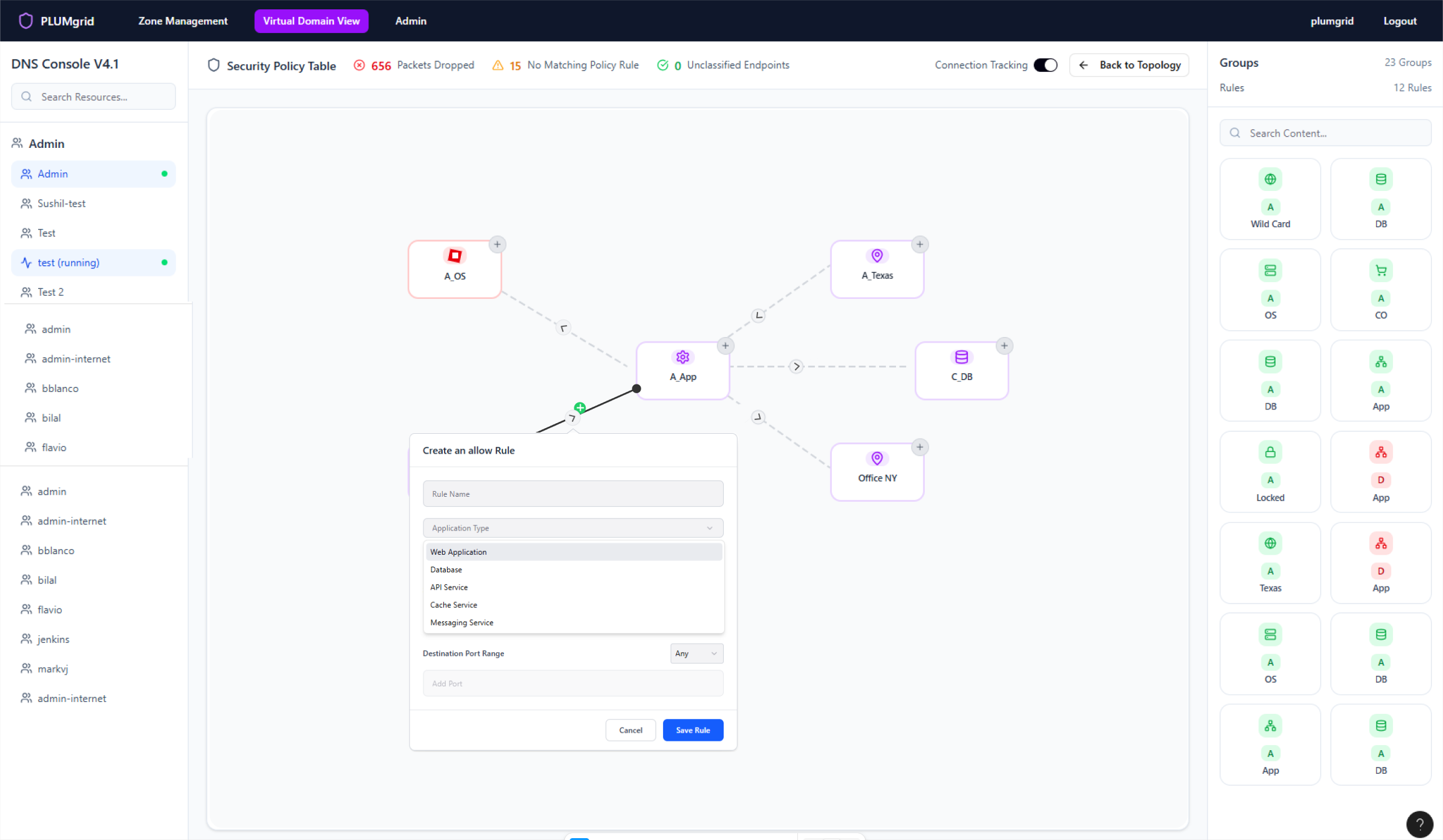
Network Policies
Create virtual network security groups and apply security policies to private and public environments.
Protocol Configuration
Trusted Connections


Next Project

Previous Project

60%
Reduction in policy setup time compared to traditional interfaces, thanks to the object-oriented UI that streamlines rule creation and management.
98%
Success rate in safely sent and received packets, achieved through precise policy enforcement across user-defined security groups and public networks.
My Role
Team
Duration
Product Designer Lead
Platform Architect, Product Manager, Scrum Master, Networking Engineers,
Ui Developers, Marketing.
2 weeks sprints (6 months)

Figma

Overview
Enables detailed configuration and monitoring of user network traffic, allowing security policies to be applied at a granular level. Rules can be customized based on traffic sources or destinations—such as IP addresses, ports, and sockets—enhancing control, visibility, and protection across the network.

Managing network security policies is often complex and time-consuming, especially when granular control is required across diverse traffic sources and destinations. Traditional tools lack intuitive visibility, making it difficult for users to confidently configure and monitor rules based on IPs, ports, and sockets.
This project addresses the challenge by enabling users to create security groups and apply protocols at a fine-grained level—through a graphical UI that enhances clarity, reduces misconfigurations, and accelerates policy deployment.
Worked closely with the platform architect and virtual network specialists to simplify complex setups. Partnered with cross-functional teams in two-week sprints, driving the process from ideation through development. Led in-person usability sessions with on-site engineers to validate and refine design.
Today, this solution and company have been acquired by VMware.
Problem
Solution


Virtual Domain
Security Policies (Protocols)







My process

Research

Ideation

Design
and Testing

Outcomes
and Lessons

Security Groups
Support the creation of groups that represents a collection of network endpoints and fully describes their properties. Everything in the same group must be treated the same way (that is it has the same policy).
Policy rule sets
Enable rule sets and support reusable policies that define secure connectivity between groups, abstracting switching and routing behaviors to simplify communication modeling.
Policy layering
Allow policies to be layered based on different roles in an organization. For instance, layering allows application owners to specify the policy pertaining to an application, while infrastructure owners can prescribe security requirements.
Research &
Discovery
This is a configuration view within the core platform that allows users to monitor packet traffic and apply security protocols accordingly.
Understanding Requirements
Research

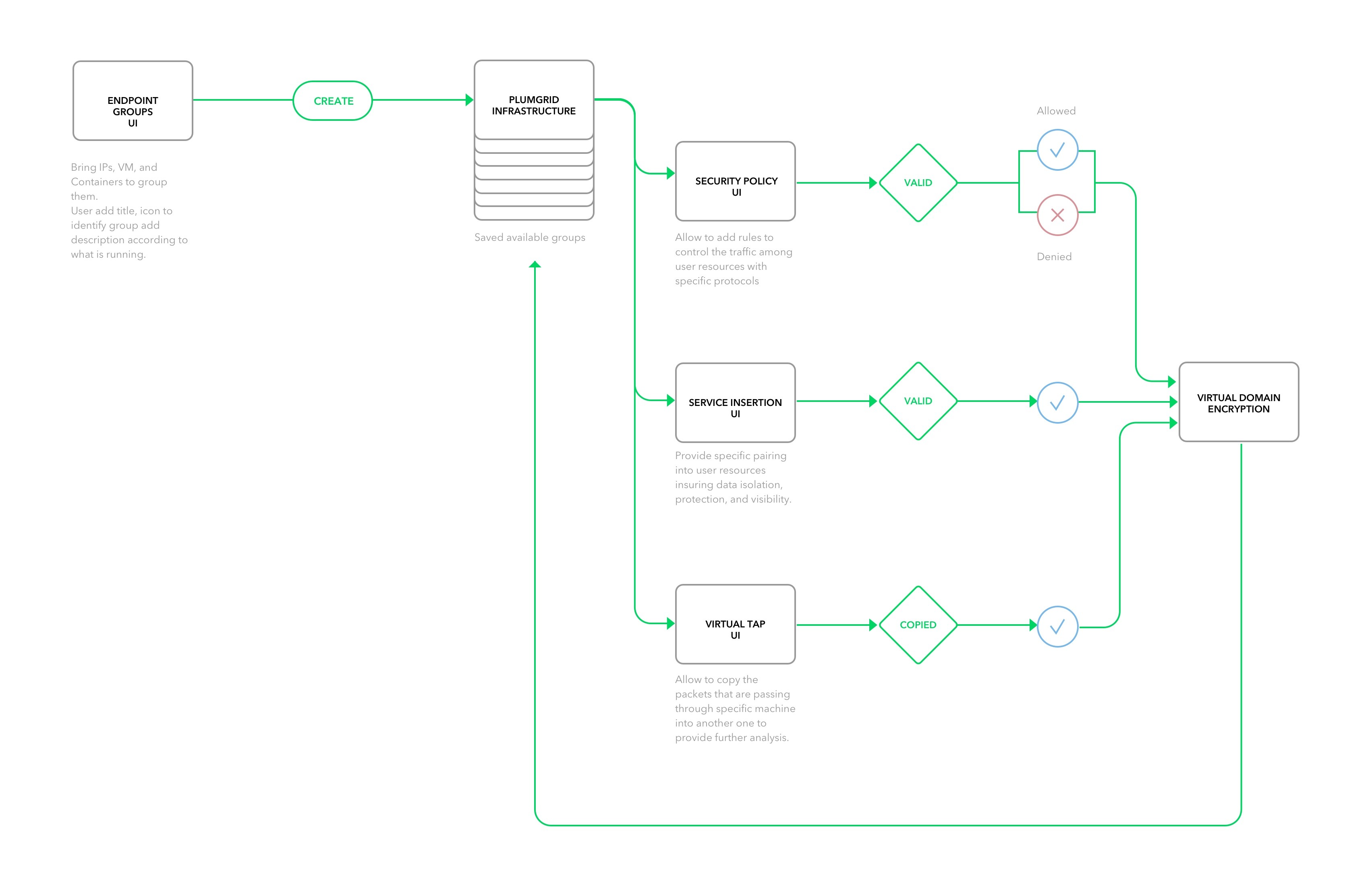
Policies Architecture Diagram
Personas
and Findings
I was able to gather internal data effectively thanks to the deep expertise of our engineers in both cloud and datacenters.
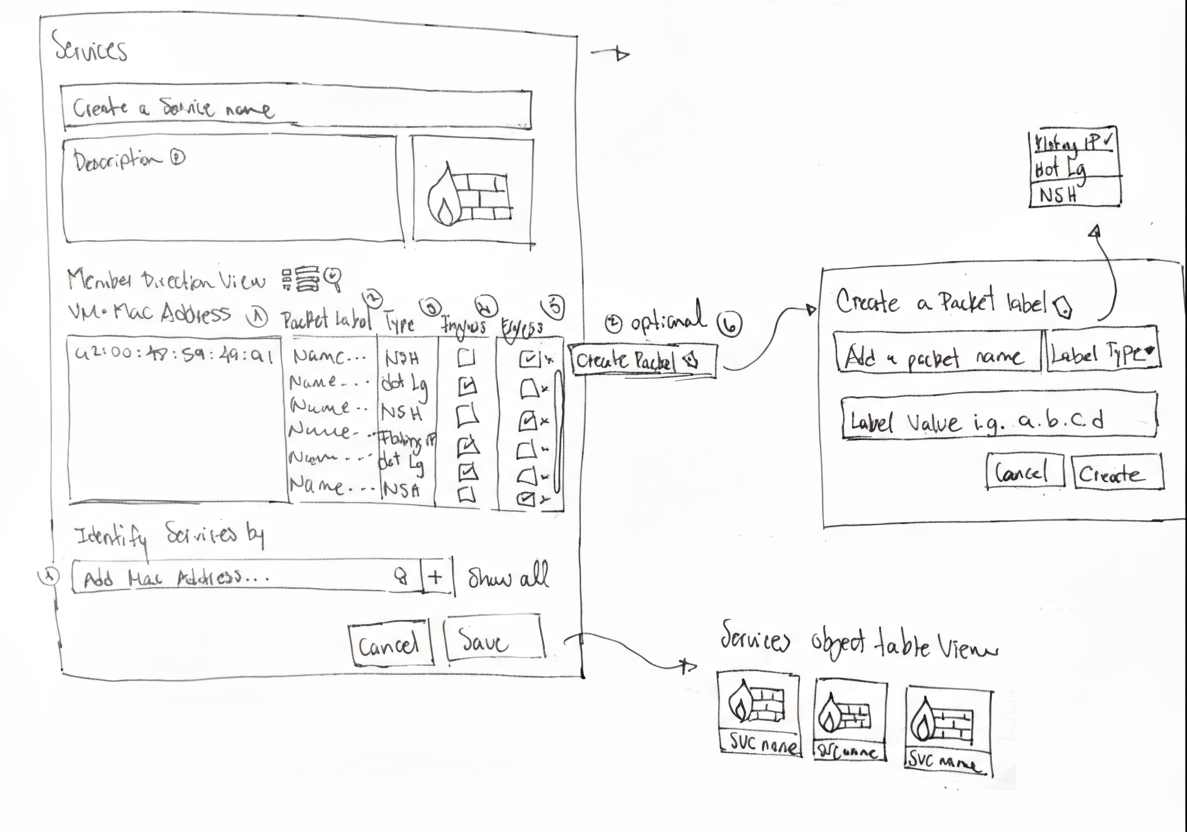
From sketching to user interface
- Intuitive Interfaces: Focuses on designing around UI objects that users can directly interact with, making the experience feel tangible.
- Mapped Mental Models: Object design mirrors real-world entities in shape and behavior, helping users understand connections and relationships.
- Collaborative Interaction: Multiple users can easily engage with visible objects, track progress, and contribute seamlessly.
- Scalable Components: UI components support multiple functionalities and states, enhancing flexibility and adding emotional satisfaction.


Object Oriented Applications
Kevin has a background in Cloud System Engineering
Goals
He implements data and systems security measurements in order to reduce exposure to downtime risks.


Cloud Administrator
Access Detailed Data
Monitor Virtual Resources
VM
VM
VM
VM



“I spend too much time digging up old data, chasing system errors, and lacking tools to monitor local networks.”
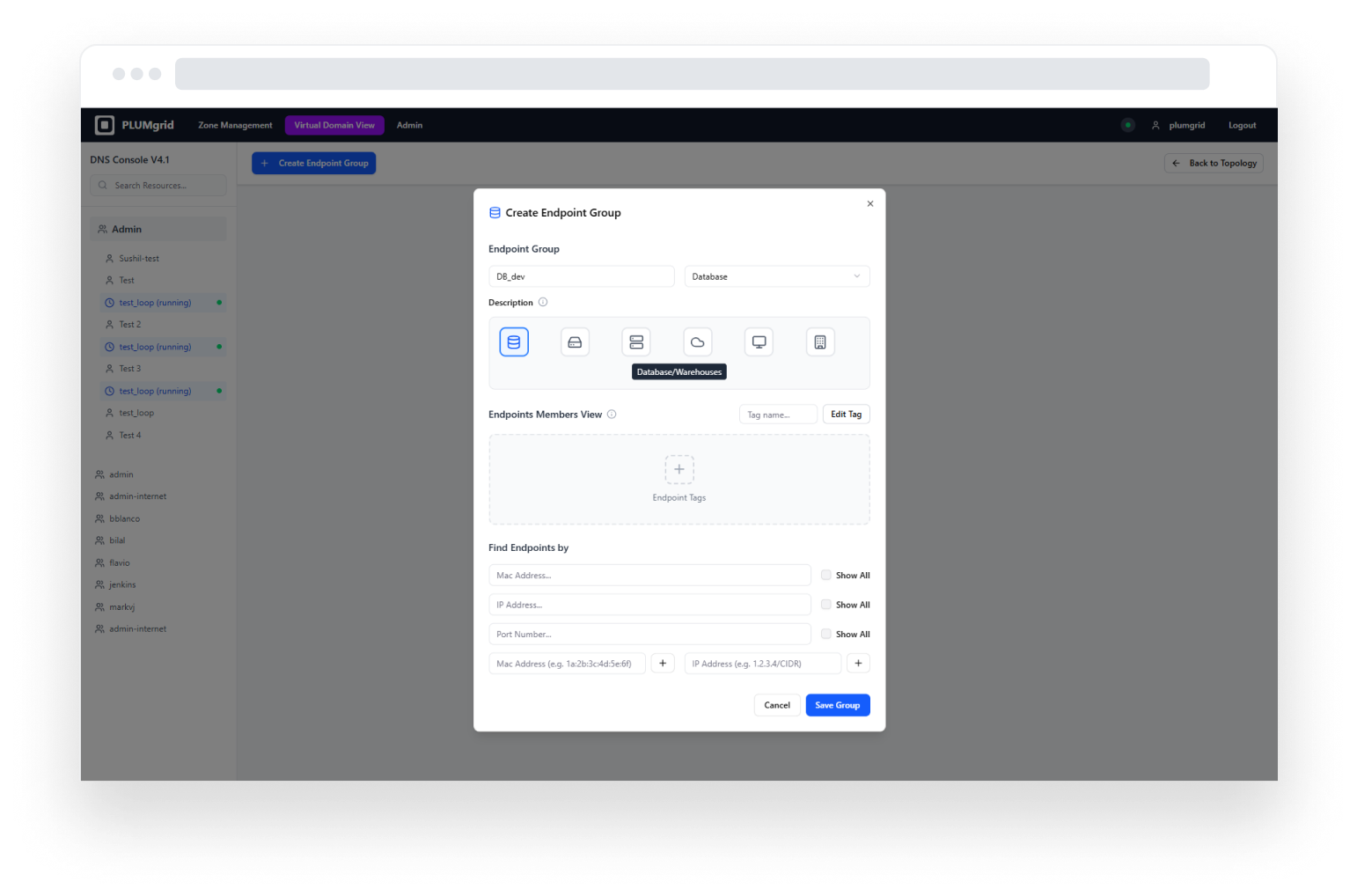
Enables created security groups and configure endpoint settings. Designed iconography to represent different applications.


Wireframing Design Process
Design
Design
and Testing

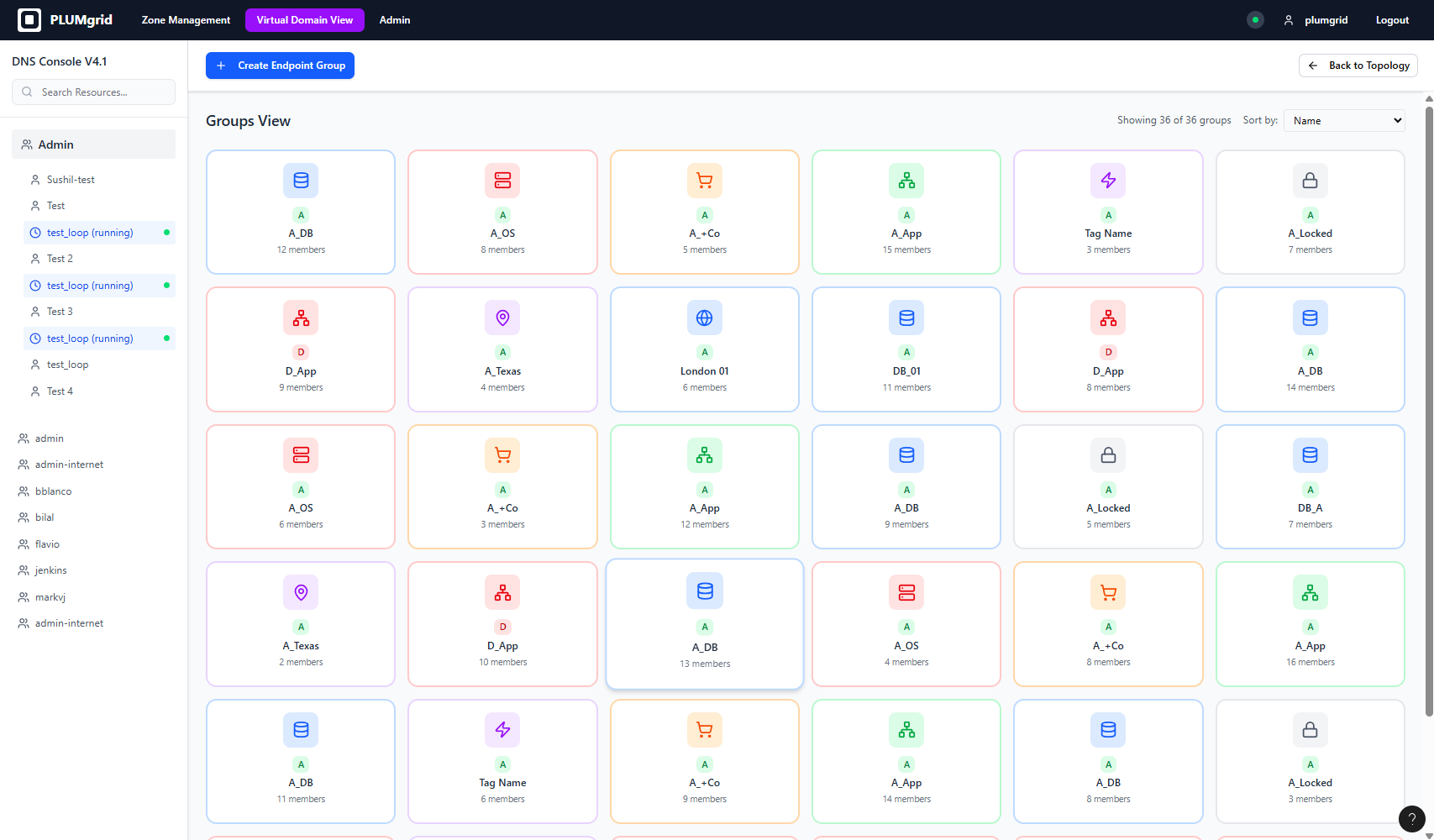
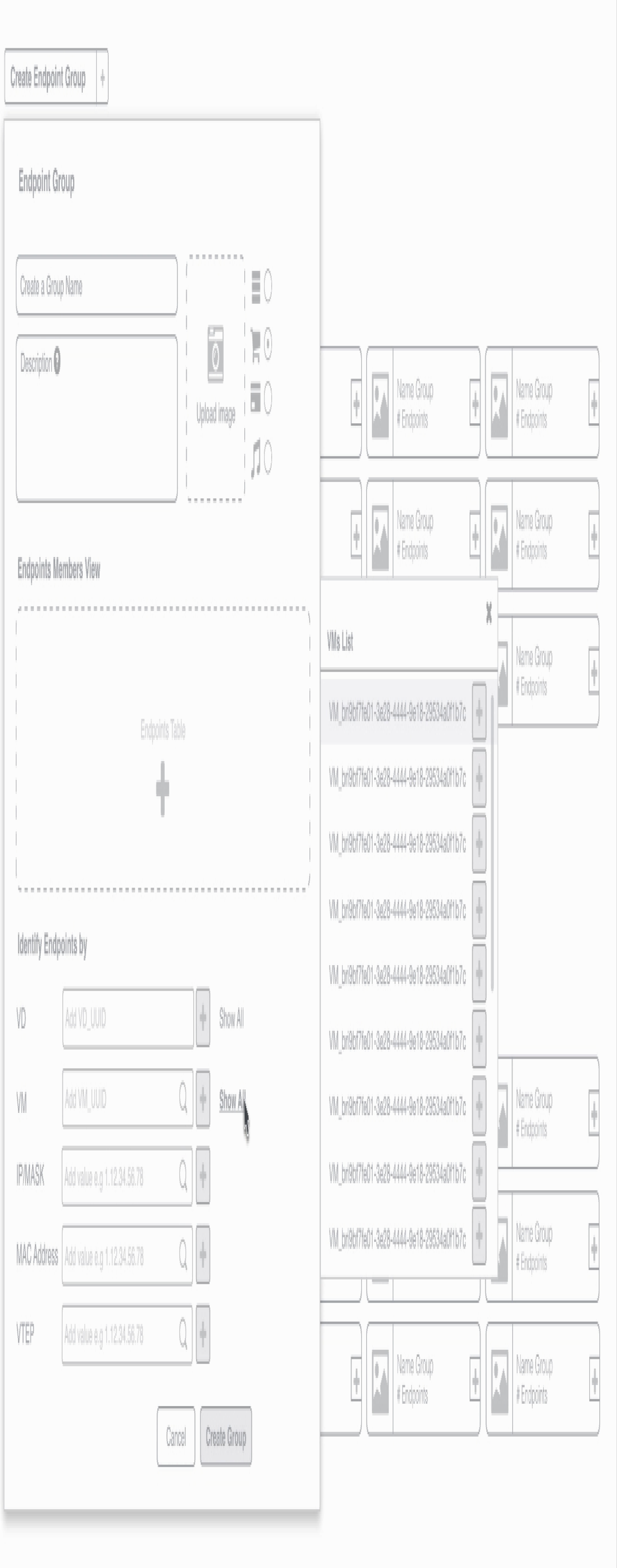
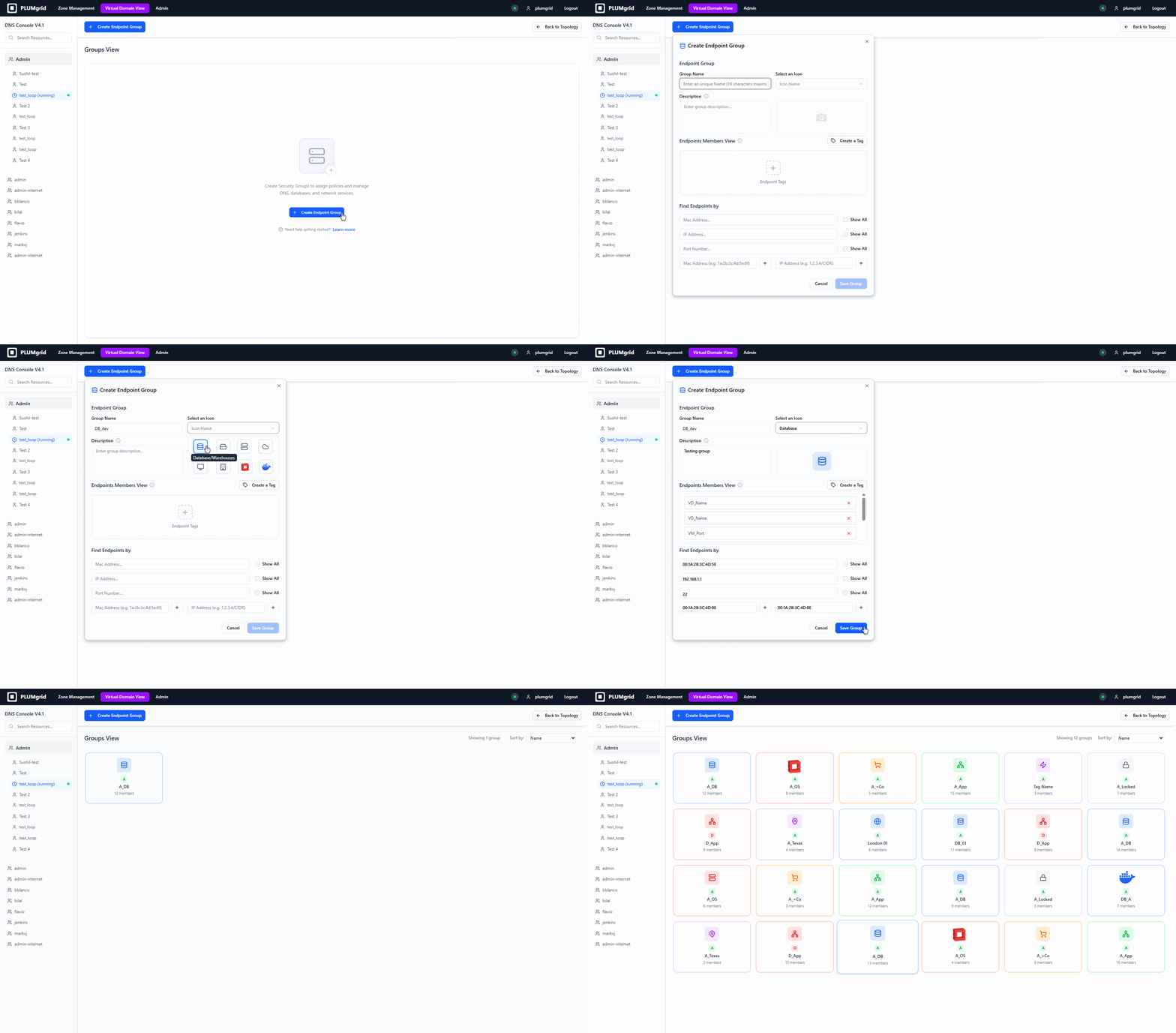
Security Groups is a configurational UI, that allows users to identify and group IP addresses.
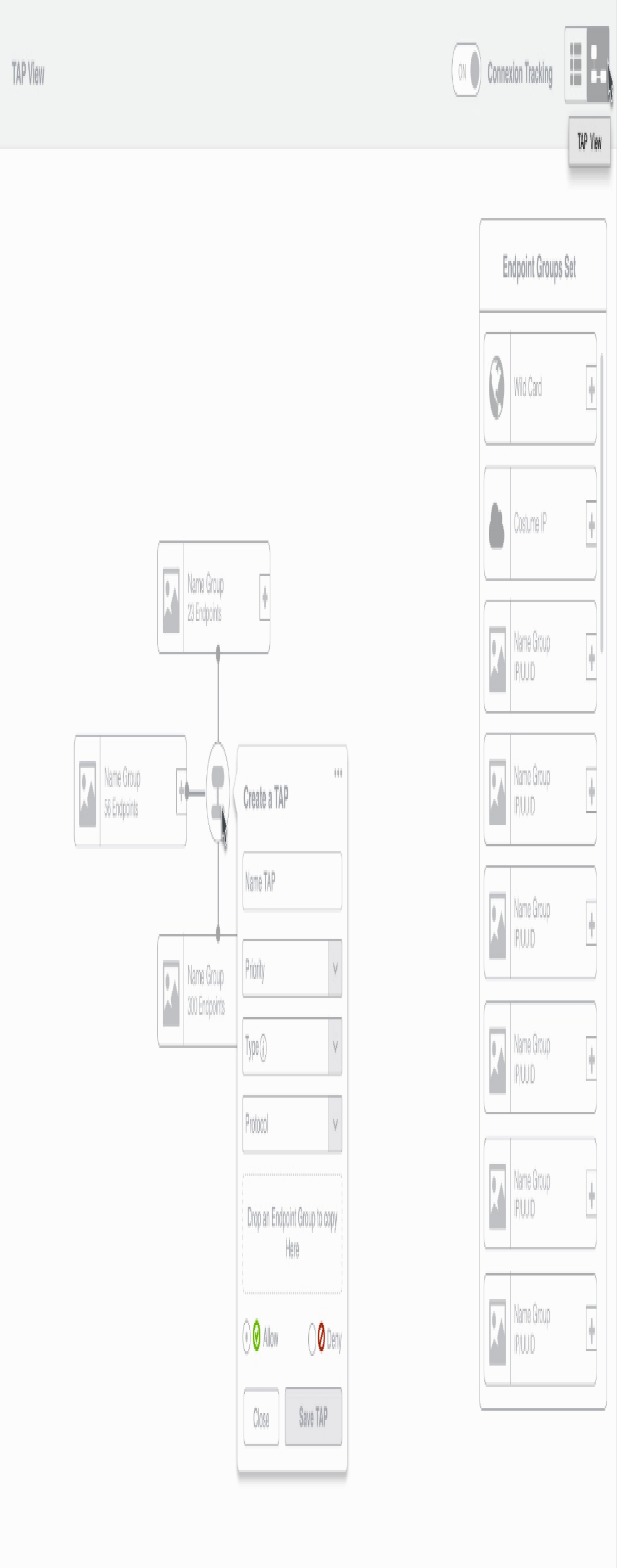
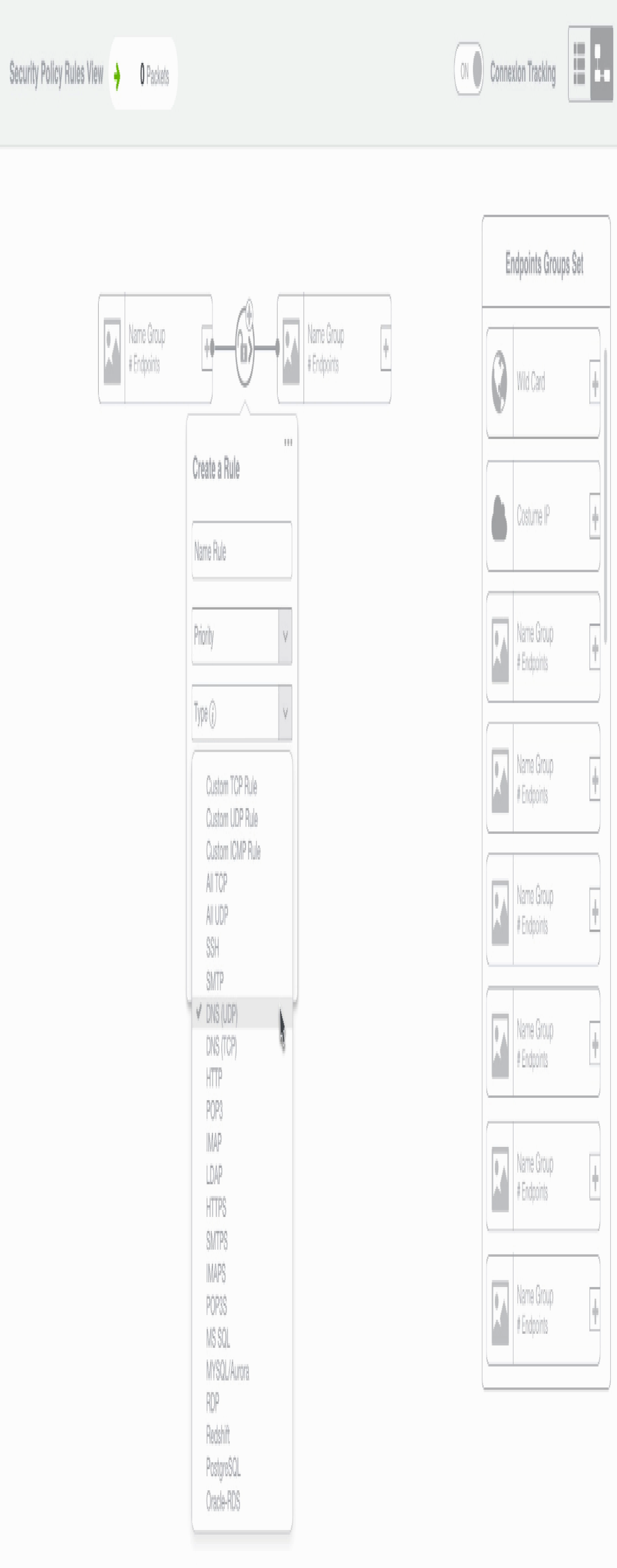
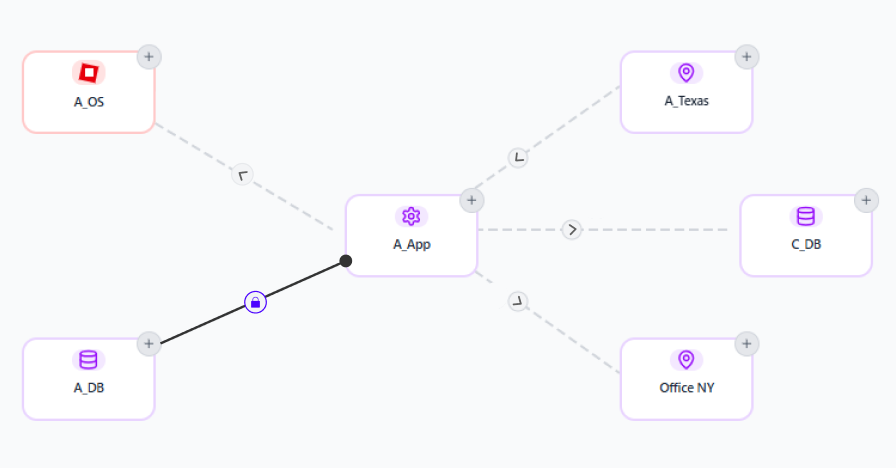
In the Security Policies view, users can find these groups and create relationships between them, assigning policy rules to these connections and to other virtual network components.
Ideation
Ideation

This is the architecture workflow based on different network permissions paths to configure endpoint groups, enforcing security policies, integrating services like firewalls and load balancers.


UX Solution
Define Security Groups

Apply Security Policies
We started by designing wireframes for this feature, which enabled the team to outline high-level workflows and identify the functionalities and content for each page.

Configuration

Configuration
Security Group Creation
This configuration view allows users to locate endpoints within their environment, assign a group name, select an icon that represents its purpose, add a brief description, and identify VMs created in other UIs such as OpenStack.
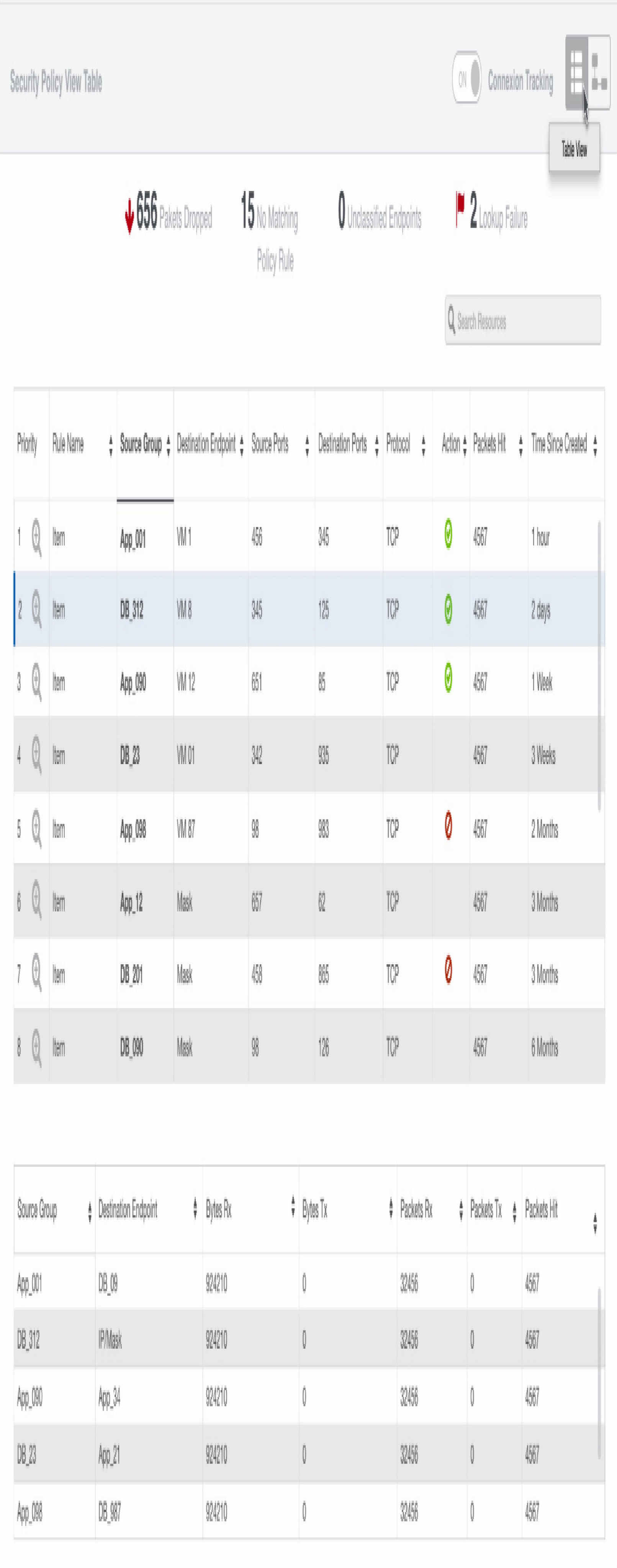
Two types of views were designed to support different mental models (diagram and table views).
Security Policies
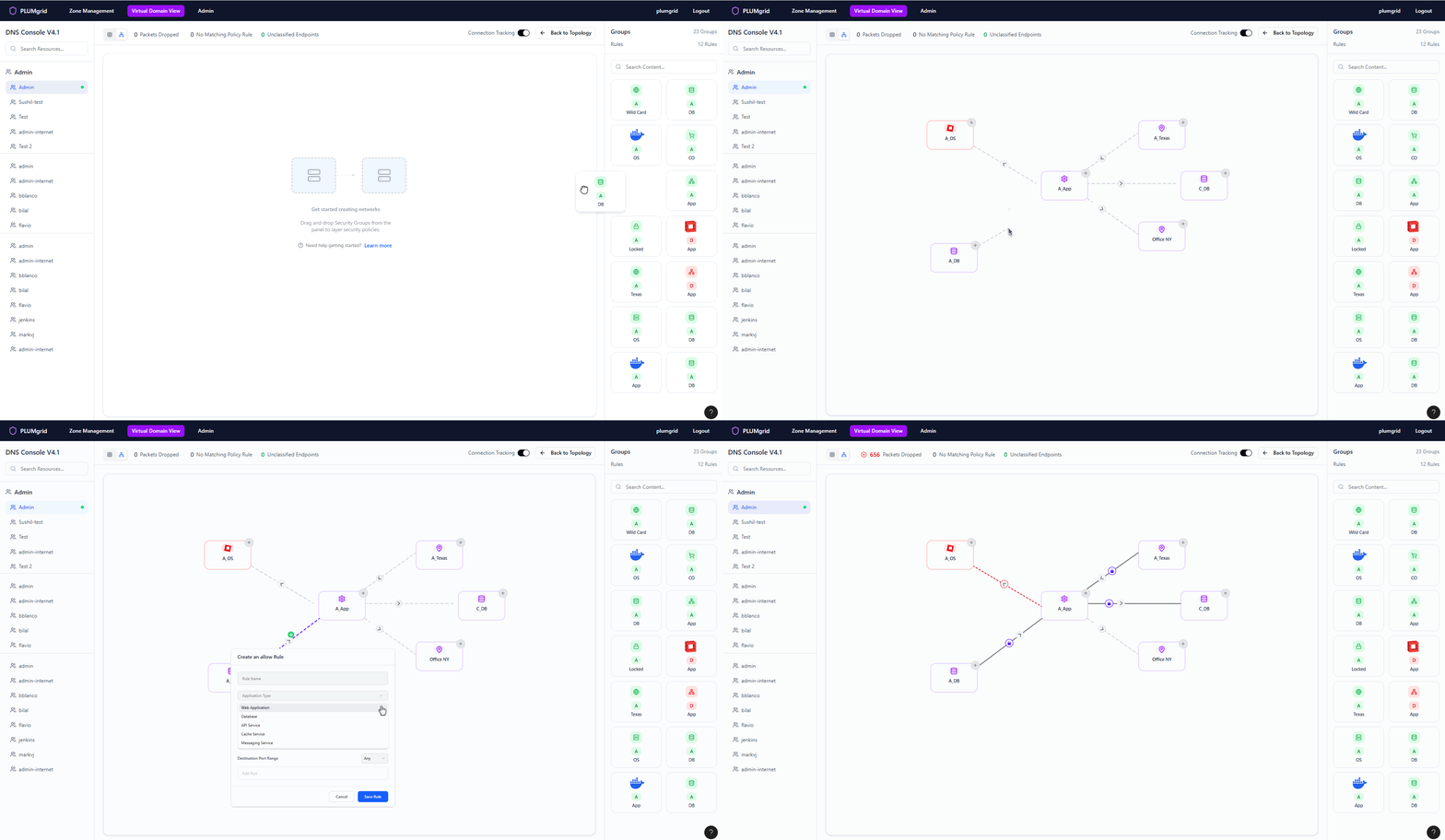
Once Security Groups are created, users can build multiple networks and apply security protocols at a granular level. They can also define traffic direction, view policy status, and monitor flows without associated rules.
A dedicated monitoring view for this functionality is available in the CloudApex dashboard.
Make simple and fun
Security configurations can be complex and intimidating. Our goal was to make them approachable—offering clarity of a network as we understand connections with diagrams.
Make data feel human
We challenged ourselves to go beyond tables and charts. Could traffic flows feel intuitive? Could policy status be instantly recognizable? We explored color, motion, proximity, and metaphor to turn raw data into meaningful, visual stories. The result: a UI that speaks to users.
Takeaways
View Monitoring View

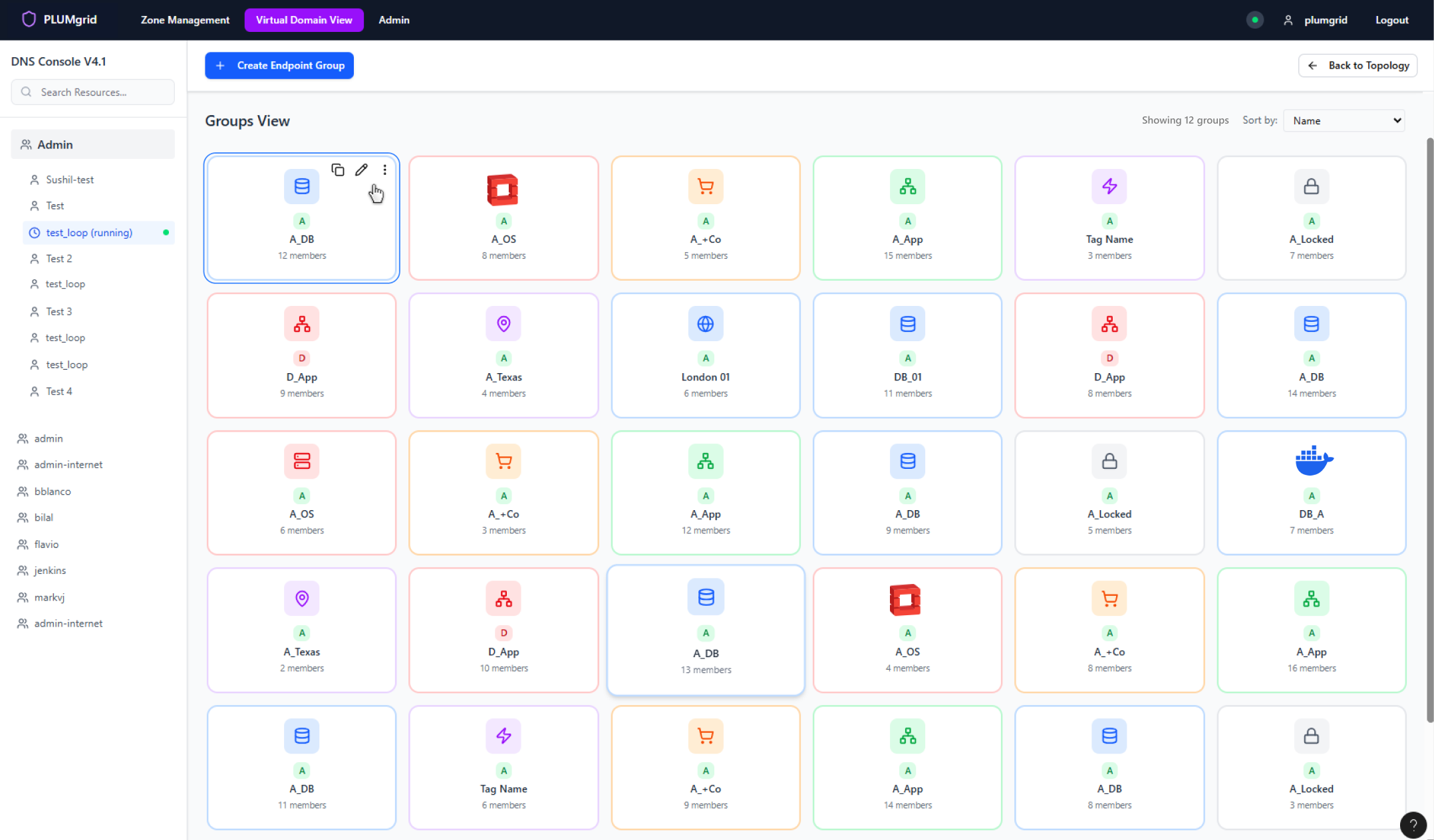
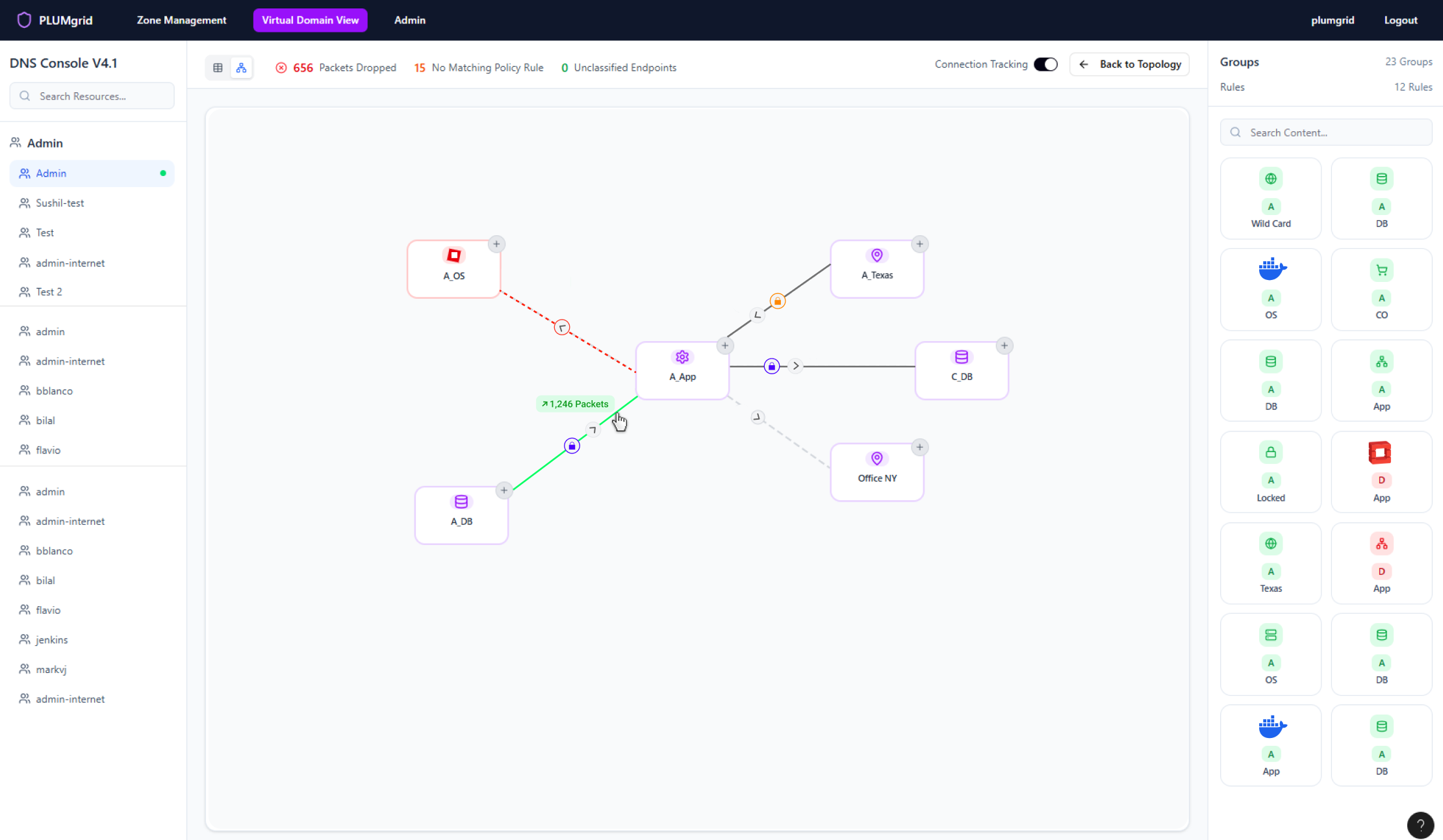

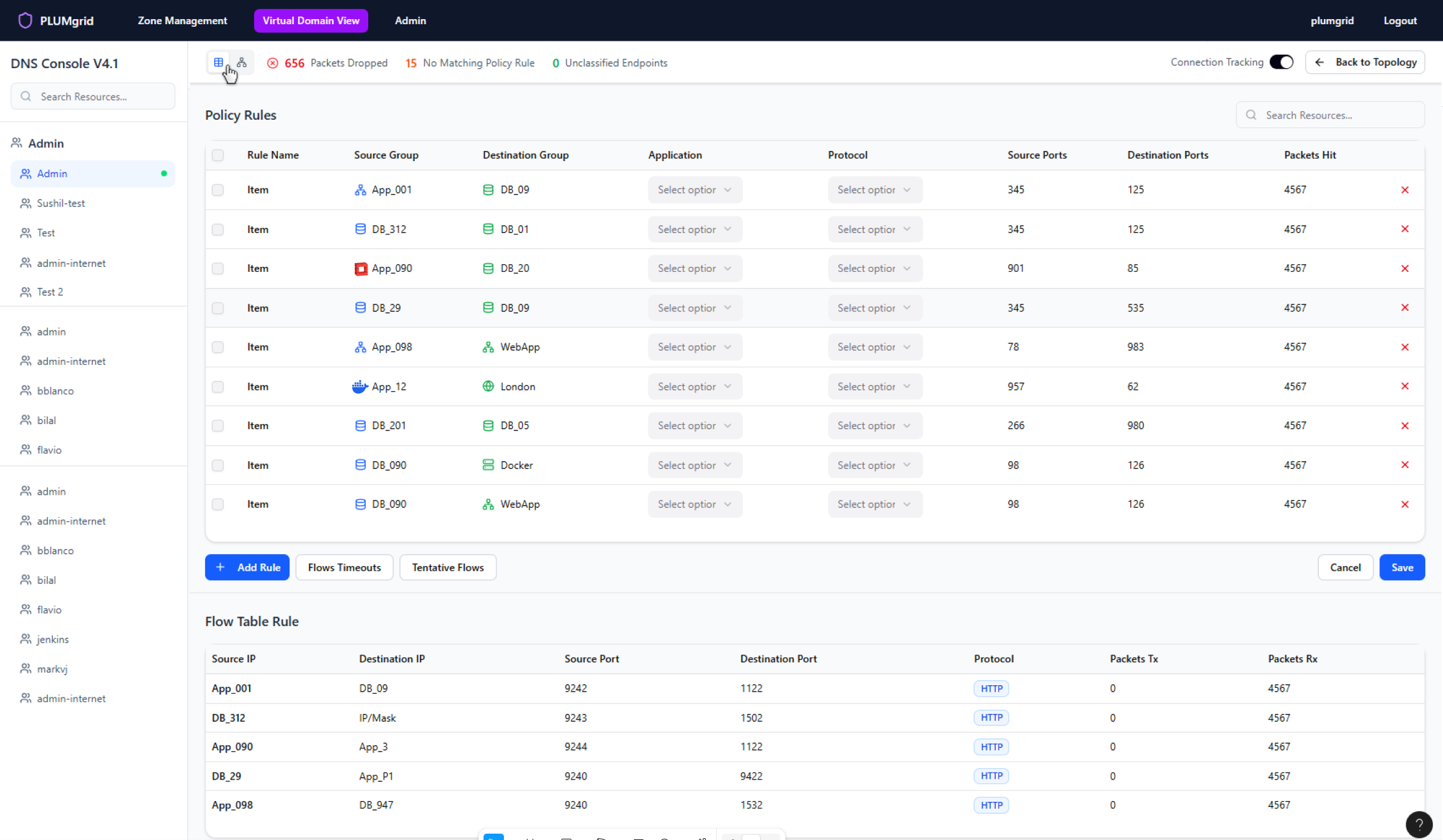

Also offer a mental model aligned with the tabular view.
Multiple micro-interactions styled to reveal functionalities maintaining a clean view.
View real-time traffic (packets sent and dropped) on hover.

Platform Functionalities


Product Design, Data Visualization, & Branding © caperi.me - San Francisco ♥ ATX | Connect


Carolina Pena
Home
About
Contact
Network Policies
Create virtual network security groups and apply security policies to private and public environments.
Protocol Configuration
Trusted Connections
Next Project
Previous Project
60%
Reduction in policy setup time compared to traditional interfaces, thanks to the object-oriented UI that streamlines rule creation and management.
98%
Success rate in safely sent and received packets, achieved through precise policy enforcement across user-defined security groups and public networks.
My Role
Team
Duration
Product Designer Lead
Platform Architect, Product Manager, Scrum Master, Networking Engineers,
Ui Developers, Marketing.
2 weeks sprints (6 months)
Figma
Overview
Enables detailed configuration and monitoring of user network traffic, allowing security policies to be applied at a granular level. Rules can be customized based on traffic sources or destinations—such as IP addresses, ports, and sockets—enhancing control, visibility, and protection across the network.
Managing network security policies is often complex and time-consuming, especially when granular control is required across diverse traffic sources and destinations. Traditional tools lack intuitive visibility, making it difficult for users to confidently configure and monitor rules based on IPs, ports, and sockets.
This project addresses the challenge by enabling users to create security groups and apply protocols at a fine-grained level—through a graphical UI that enhances clarity, reduces misconfigurations, and accelerates policy deployment.
Worked closely with the platform architect and virtual network specialists to simplify complex setups. Partnered with cross-functional teams in two-week sprints, driving the process from ideation through development. Led in-person usability sessions with on-site engineers to validate and refine design.
Today, this solution and company have been acquired by VMware.
Problem
Solution
Virtual Domain
Security Policies (Protocols)

My process
Research
Ideation
Design
and Testing
Outcomes
and Lessons
Security Groups
Support the creation of groups that represents a collection of network endpoints and fully describes their properties. Everything in the same group must be treated the same way (that is it has the same policy).
Policy rule sets
Enable rule sets and support reusable policies that define secure connectivity between groups, abstracting switching and routing behaviors to simplify communication modeling.
Policy layering
Allow policies to be layered based on different roles in an organization. For instance, layering allows application owners to specify the policy pertaining to an application, while infrastructure owners can prescribe security requirements.
Research &
Discovery
This is a configuration view within the core platform that allows users to monitor packet traffic and apply security protocols accordingly.
Understanding Requirements
Research
Policies Architecture Diagram
Personas
and Findings
I was able to gather internal data effectively thanks to the deep expertise of our engineers in both cloud and datacenters.
From sketching to user interface
- Intuitive Interfaces: Focuses on designing around UI objects that users can directly interact with, making the experience feel tangible.
- Mapped Mental Models: Object design mirrors real-world entities in shape and behavior, helping users understand connections and relationships.
- Collaborative Interaction: Multiple users can easily engage with visible objects, track progress, and contribute seamlessly.
- Scalable Components: UI components support multiple functionalities and states, enhancing flexibility and adding emotional satisfaction.
Object Oriented Applications
Kevin has a background in Cloud System Engineering
Goals
He implements data and systems security measurements in order to reduce exposure to downtime risks.
Cloud Administrator
Access Detailed Data
Monitor Virtual Resources
VM
VM
VM
VM
“I spend too much time digging up old data, chasing system errors, and lacking tools to monitor local networks.”
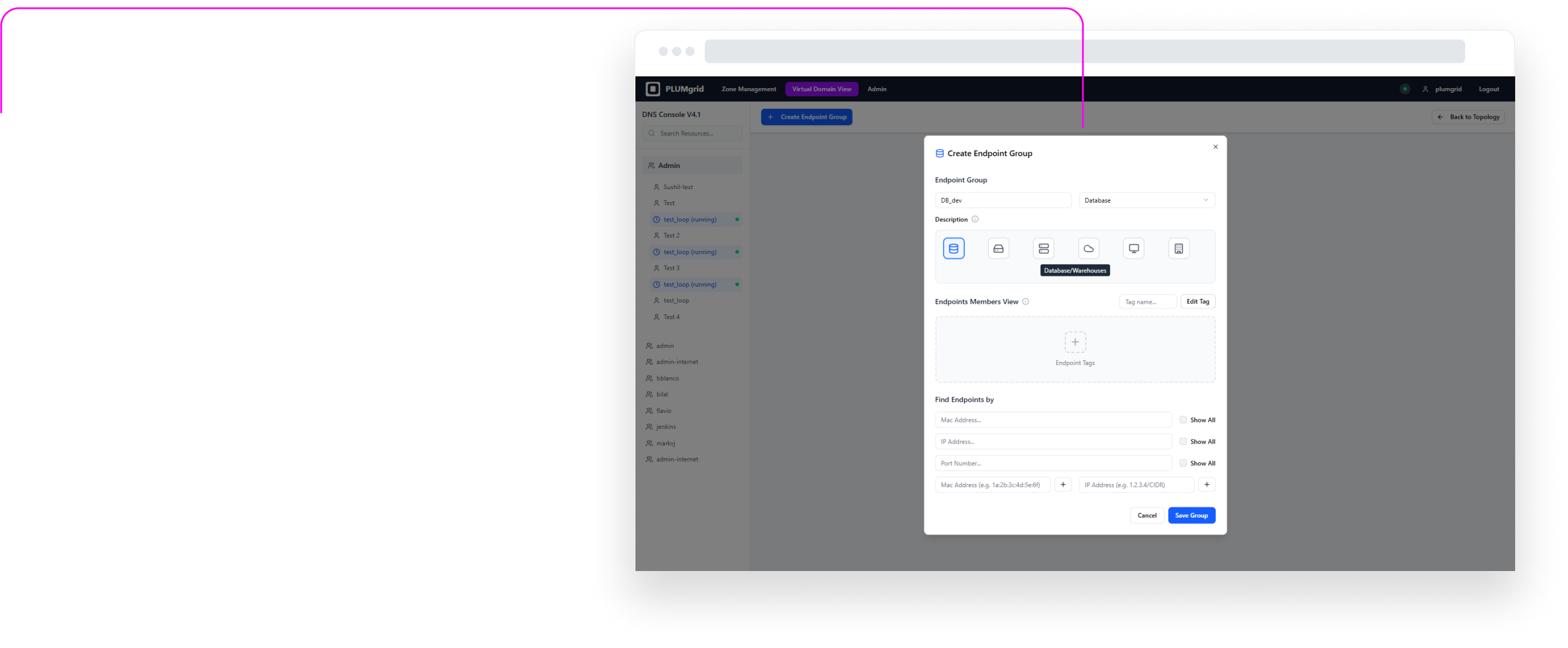
Enables created security groups and configure endpoint settings. Designed iconography to represent different applications.
Wireframing Design Process
Design
Design
and Testing
Security Groups is a configurational UI, that allows users to identify and group IP addresses.
In the Security Policies view, users can find these groups and create relationships between them, assigning policy rules to these connections and to other virtual network components.
Ideation
Ideation
This is the architecture workflow based on different network permissions paths to configure endpoint groups, enforcing security policies, integrating services like firewalls and load balancers.


UX Solution
Define Security Groups
Apply Security Policies
We started by designing wireframes for this feature, which enabled the team to outline high-level workflows and identify the functionalities and content for each page.
Configuration
Configuration
Security Group Creation
This configuration view allows users to locate endpoints within their environment, assign a group name, select an icon that represents its purpose, add a brief description, and identify VMs created in other UIs such as OpenStack.
Two types of views were designed to support different mental models (diagram and table views).
Security Policies
Once Security Groups are created, users can build multiple networks and apply security protocols at a granular level. They can also define traffic direction, view policy status, and monitor flows without associated rules.
A dedicated monitoring view for this functionality is available in the CloudApex dashboard.
Make simple and fun
Security configurations can be complex and intimidating. Our goal was to make them approachable—offering clarity of a network as we understand connections with diagrams.
Make data feel human
We challenged ourselves to go beyond tables and charts. Could traffic flows feel intuitive? Could policy status be instantly recognizable? We explored color, motion, proximity, and metaphor to turn raw data into meaningful, visual stories. The result: a UI that speaks to users.
Takeaways
View Monitoring View
Also offer a mental model aligned with the tabular view.
Multiple micro-interactions styled to reveal functionalities maintaining a clean view.
View real-time traffic (packets sent and dropped) on hover.
Platform Functionalities

Product Design, Data Visualization, & Branding © caperi.me - San Francisco ♥ ATX | Connect
Carolina Pena
Home
About
Contact